
ARCHITECTS · INTERIOR DESIGNERS · HOME STAGERS
BUILD FF&E PROCUREMENT SCHEDULE AND FURNITURE SHOPPING LIST WITH AI

500+ Designers trained ǀ Live since 2024
Instead of copy-pasting product details field by field in Excel, learn the Claude automation workflow that helps you create polished, professional furniture shopping lists and FF&E procurement schedules.
THE TRADITIONAL WAY
Copy-pasting product names, dimensions, prices and other details into Excel or Google Sheets, row by row
Downloading product images, removing backgrounds and inserting them manually
Updating product information and recalculating totals every time something changes
Spending extra time formatting spreadsheets to make them consistent, polished and client-ready
Managing multiple versions of the same file and trying to keep track of which one is current
WITH THIS WORKFLOW
Claude automatically pulls product names, dimensions, colors, SKU, prices, and other details from the product link
Product image backgrounds are removed, and the images are placed directly into the schedule
Product information and calculations can be updated as the project changes
A consistent, polished, and professionally designed, client-ready presentation across your schedules
Export the schedule as a well-designed PDF, PPTX, Excel file, or live link that you can easily share with your clients
For a 30-item schedule, manually transferring 12+ product details per item means entering 360+ data points into Excel or Google Sheets. That can easily become 700+ repetitive copy-paste actions before images, formatting, and calculations are included. With the Claude workflow, each item can be added with just a few simple inputs, while the information and calculations are organized for you.
THE WORKFLOW
CREATE PROFESSIONAL, WELL-DESIGNED AND STRUCTURED DOCUMENTS FASTER
Pre-recorded video lessons (1.5 hours total), in English with English subtitles, walk you through the workflow step by step - from setting up Claude to building, refining and sharing a client-ready document.
Claude, set up right
Learn the essential Claude settings and data-protection basics before you start working. Even if you’ve never used Claude before, I’ll show you the setup and workflow step by step. You will also receive a PDF document explaining the prompts and the most important steps.
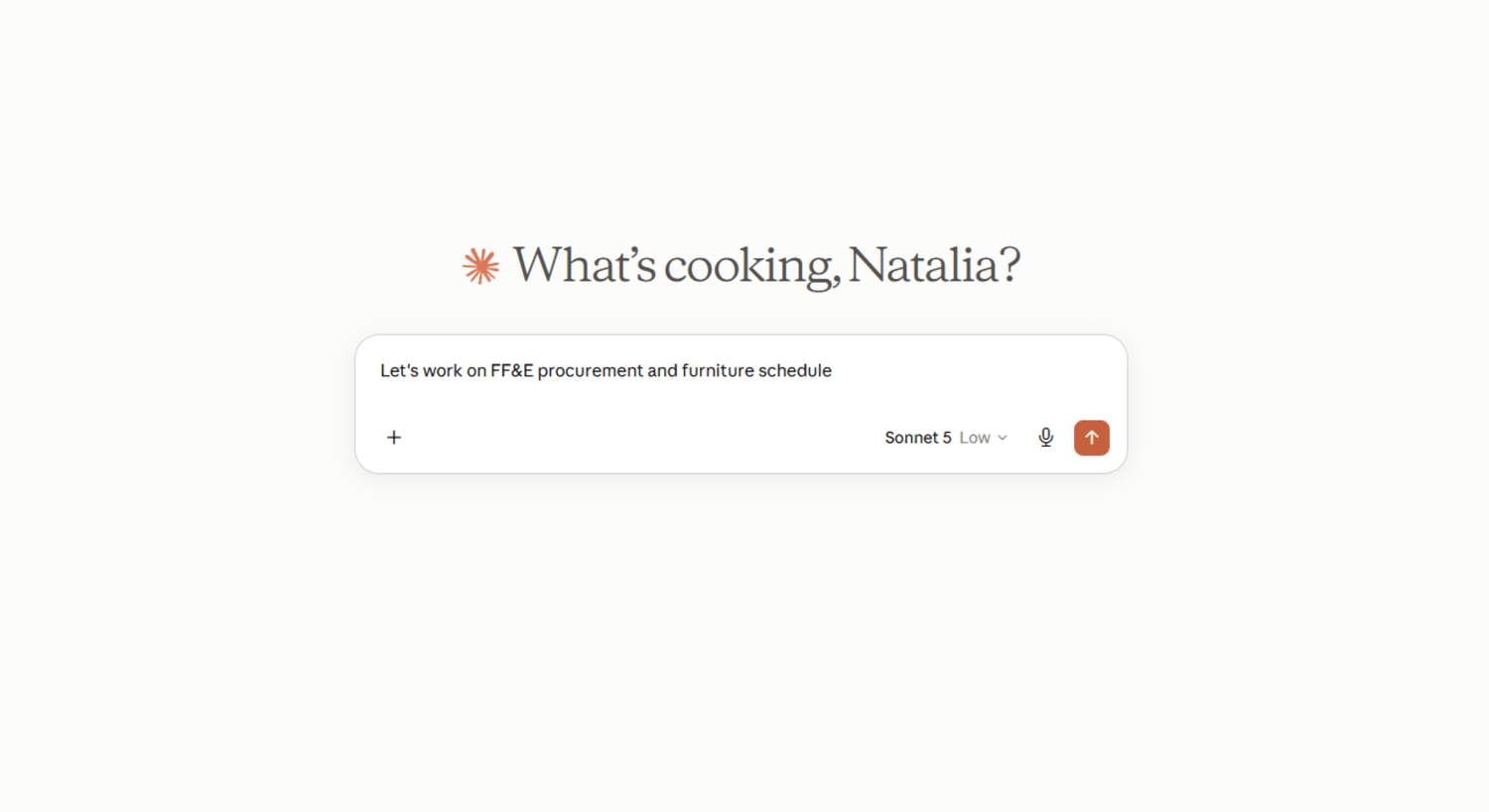
Build a FF&E procurement schedule
Let the workflow collect and organize available product information, such as brand, product name, dimensions, color, price, SKU, and other details. You can change the status, reorder items, correct information, and refine the schedule as your project develops.
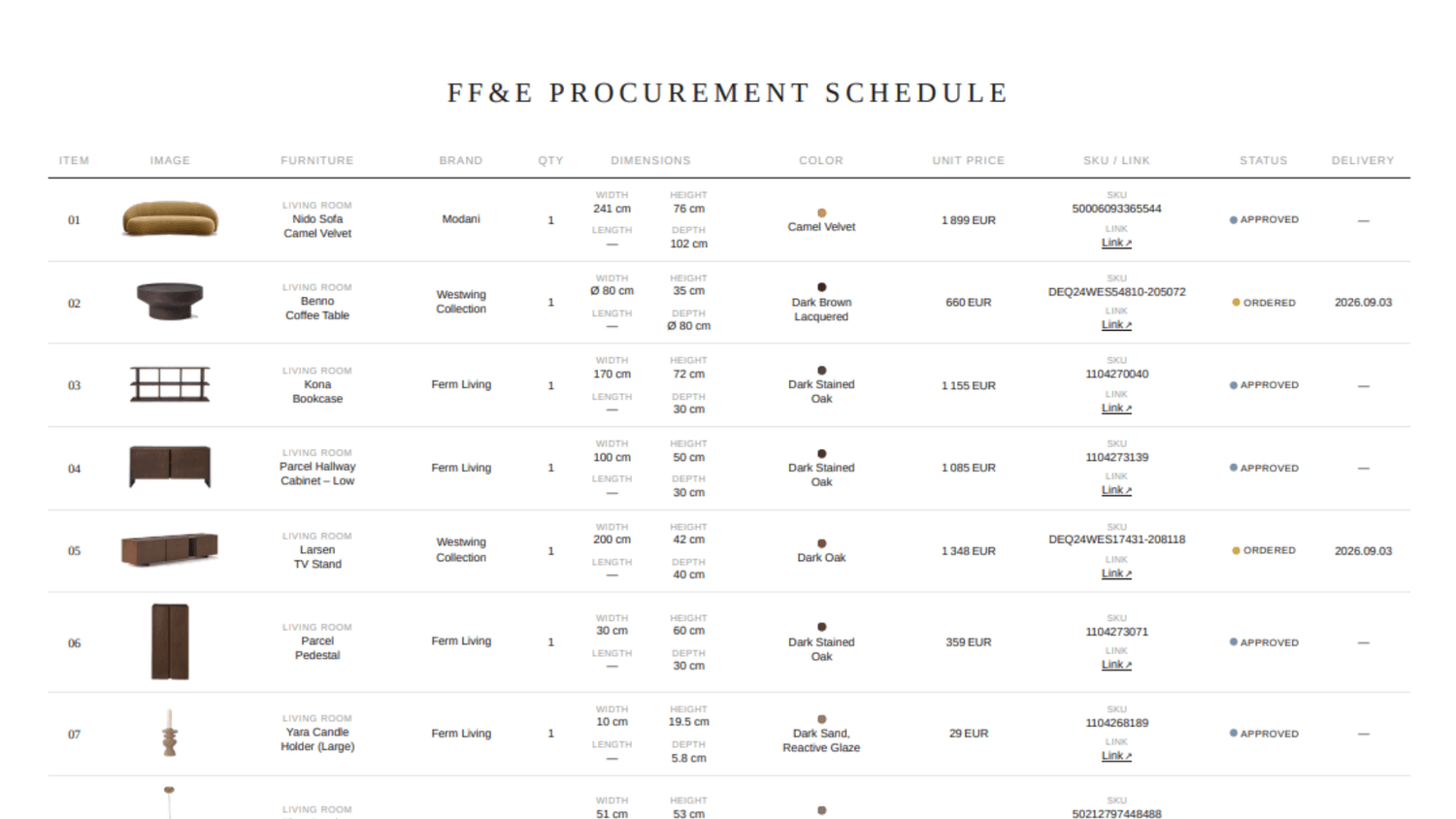
Build a furniture shopping list
Use the workflow to create a client-ready furniture shopping list without manually copying product information into a spreadsheet. Claude organizes product details, removes backgrounds from product images, inserts the images, and calculates totals for you.
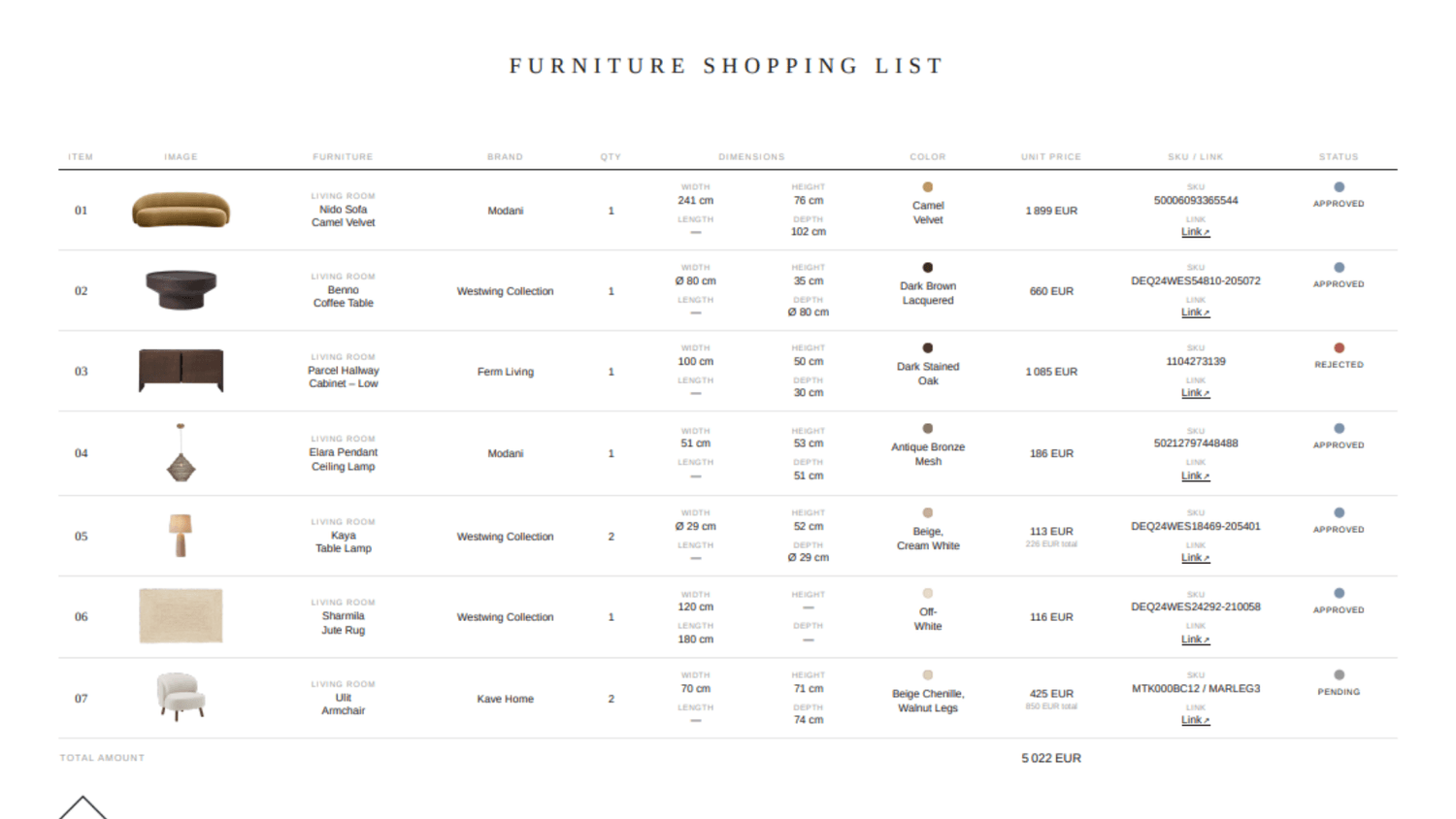
Optimize, export & share
Adapt the master prompts to your language, currency, logo and visual style. Export your schedule as a polished PDF, editable PPTX, Excel file or live link that you can easily share with your clients. You’ll also learn how to continue working with the document in Canva.
WHAT'S INCLUDED
Everything you need to run the workflow yourself
No extra software to buy, no technical skills required - just Claude, the products you’d like to include in your documents, and this course. You can start the workflow with Claude Free. For larger FF&E schedules, Claude Pro is recommended because it provides higher usage limits.
Pre-recorded video lessons
6 lessons (1.5 hours total) in English with English subtitles, ready to watch anytime, at your own pace. A PDF guide includes the prompts, workflows, and all important information covered in the course.
Master prompts & templates
Copy-paste prompts for both document types - including original and customizable versions that you can adapt to your own workflow.
Real example documents
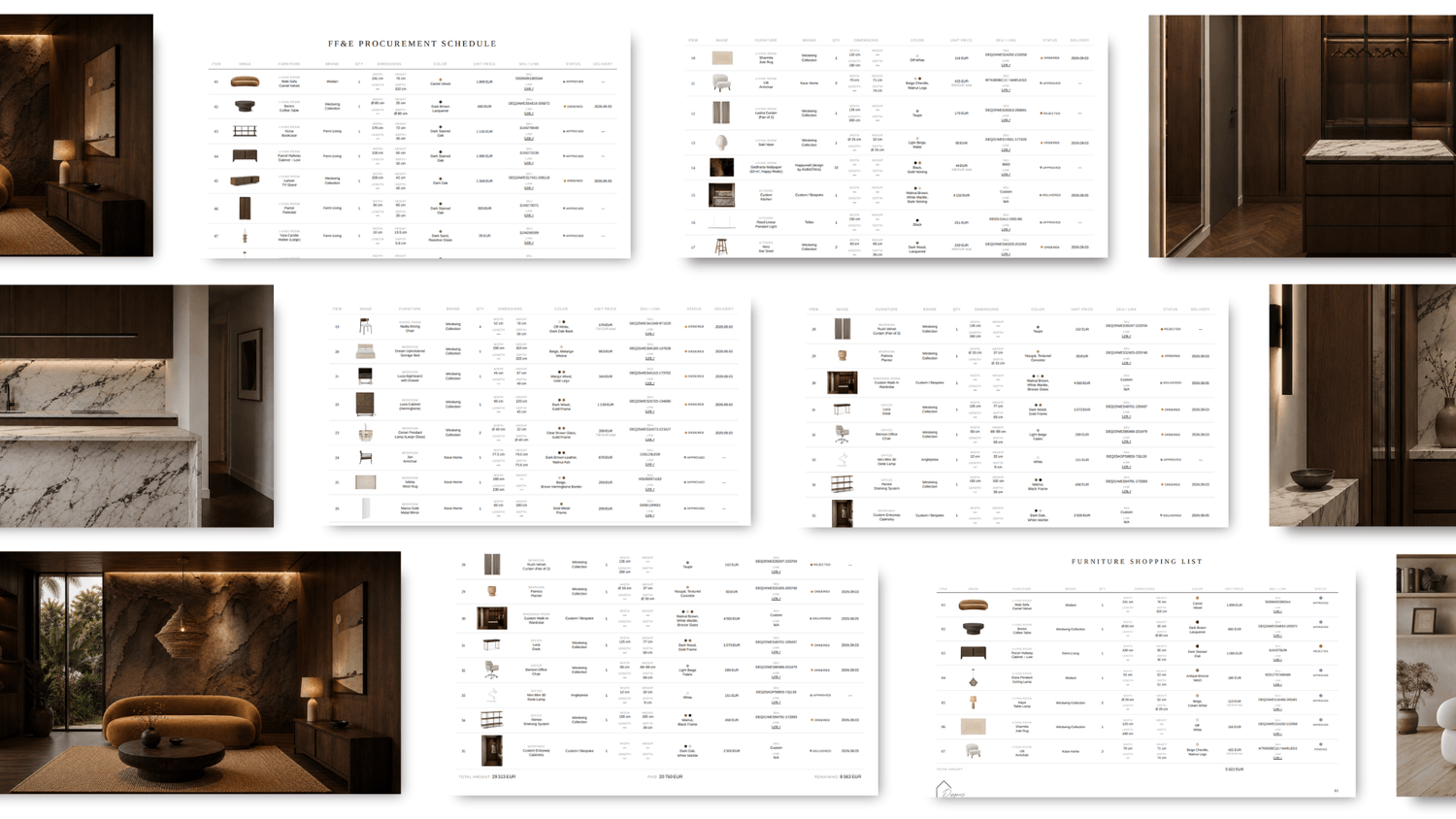
Completed furniture shopping list and FF&E procurement schedule to reference and adapt.
Instant access
Access the lessons after purchase and work through the workflow at your own pace.
WHO IT'S FOR
BUILD FOR ANYONE WHO PREPARES SUCH DOCUMENTS FOR THEIR WORK
FOR ARCHITECTS
Keep furniture, finishes, product details, quantities, and prices organized in one structured procurement schedule.
FOR INTERIOR DESIGNERS
Manage product selections, approvals, prices, quantities, and status updates while creating a polished, client-ready documents instead of a standard spreadsheet.
FOR HOME STAGERS
Organize furniture selections, product images, quantities and prices into a clear, consistent and professionally designed document.
START TODAY
FF&E PROCUREMENT SCHEDULE & FURNITURE SHOPPING LIST COURSE
A practical, step-by-step workflow for creating professional procurement documents with Claude.
THIS COURSE
Furniture Shopping List & FF&E Procurement Course
€ 69
One-time payment · Instant access
6 pre-recorded video lessons — 1.5 hours total, in English with English subtitles
Master prompts for both the Furniture Shopping List and FF&E Procurement Schedule
Translation prompt to use the workflow in your own language
Furniture Shopping List example
FF&E Procurement Schedule example
Product data extraction and image background removal workflow
Automatic calculations, status tracking and currency conversion
Export to PDF, PPTX, Excel and a live link
Practical tips for customizing the layout, logo, colors and document structure
Build polished, structured procurement documents faster - without manually copying product information into Excel field by field.
FULL SYSTEM
AI for Interior Designers
11-module Course
€ 359
One-time payment · Instant access
11 modules for interior designers
11 pre-recorded modules (9+ hours) covering ChatGPT, Claude, Google Gemini, and Nano Banana workflows
Rendering, redesign & visualization workflows
Moodboards & client presentations
Floor plans, CAD drawings and visual workflows
Video & social content workflows
Client communication and business workflows
Furniture Shopping List & FF&E Procurement Schedule course included
Future course updates included until June 2027
Practical workflows explained step by step
Suitable for beginners and experienced AI users
For designers who want to use AI beyond procurement. The full course covers visual, client and business workflows.
ABOUT DESIGNERS LEARN AI
From live workshops to a courses for interior designers
My work with interior designers, architects, and home stagers has shown me where AI can genuinely support the design process - and where it only adds complexity.
Through training more than 500 professionals, I’ve seen the same needs come up again and again: faster visual development, less repetitive work, clearer client communication, and workflows that fit naturally into an existing design practice.
That practical experience became the foundation of Designers Learn AI - courses focused on practical, usable workflows that help interior designers, architects, and home stagers work more efficiently.
Natalia, the founder of Designers Learn AI

SIGN UP FOR THE NEWSLETTER
FREQUENTLY ASKED QUESTIONS
No. You do not need technical or coding experience. The course walks you through the Claude setup, features, prompts, and workflow step by step, even if you have never used Claude before.
The course teaches you how to use Claude to create two professional, client-ready documents: an FF&E procurement schedule and a furniture shopping list. You’ll learn how to extract product information from product links, organize details such as brand, product name, dimensions, color, price, and SKU, process product images, calculate totals, track status, customize the documents, and export or share them as PDF, PPTX, Excel, or a live link.
You can follow the course and start building your documents with Claude Free. The main limitation is token usage: when working with a larger FF&E schedule containing many items, you may reach your usage limit and need to wait before continuing.
Claude Pro is therefore recommended if you plan to create larger schedules or use the workflow frequently.
You can export your documents as a PDF, editable PPTX or Excel file, or create a live shareable link. You can also continue working with the document in Canva and adapt the layout, logo, colors, and visual style to your business.
A Furniture Shopping List is ideal for the selection and approval stage of a project, with simple statuses such as Pending, Approved and Rejected.
An FF&E procurement schedule provides a more detailed way to manage the procurement process, including product information, quantities, prices and status updates as items move through the project.
The course teaches you how to create and use both types of documents with Claude.
Yes. The course includes a translation prompt that allows you to adapt the workflow to your own language and currency. You can also customize the prompts and documents with your own logo, visual style, columns, and project requirements.
No. You do not need to give Claude access to your email, calendar or computer files. The workflow works with the product links and information you provide. The course also covers essential Claude settings and data-protection basics before you start working with the workflow.
You’ll be able to create a professional FF&E procurement schedule and client-ready furniture shopping list with Claude, including product information, images, calculations and status tracking.
You’ll also learn a workflow that can be adapted to other document-creation tasks in your business. Once you understand how to structure the prompts and workflow, you can apply the same approach to different types of business documents, such as presentations, checklists, HTML-based documents and other structured project materials. The type of document you create depends on your needs and how you adapt the workflow.
AI & Canva courses for interior designers, architects and home stagers
www.designerslearnai.com




© 2026 Designers Learn AI. All rights reserved.
RECEIVE AI TIPS
FOR INTERIOR DESIGNERS